Keep your mods in sync
Update to the latest modpack
When mods are added, removed, or bumped, re-import the profile code in r2modman. It reconciles your local install with the shared profile — adding what's new and removing what's gone. Takes about a minute.
You'll need this
The shared profile code
Copy it now — you'll paste it into r2modman in step 3.
019f8afc-79e1-6ad5-001c-4d44d7b5b698Step 01
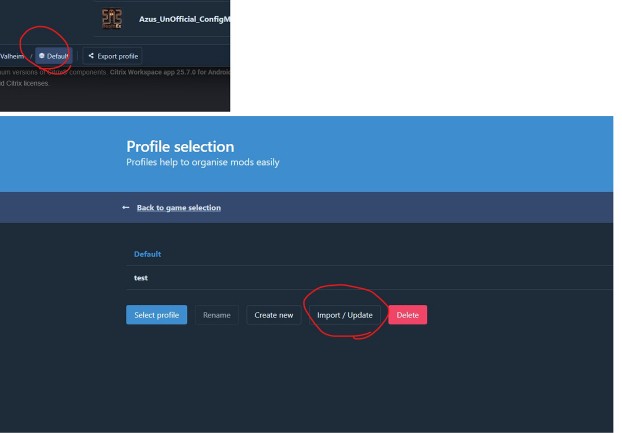
Click Import / Update
In r2modman, with your Valheim profile open, click the red Import / Update button on the left of the profile screen.
Not sure which profile? It's the one you join the server with — usually Default if you only have one.
Step 02
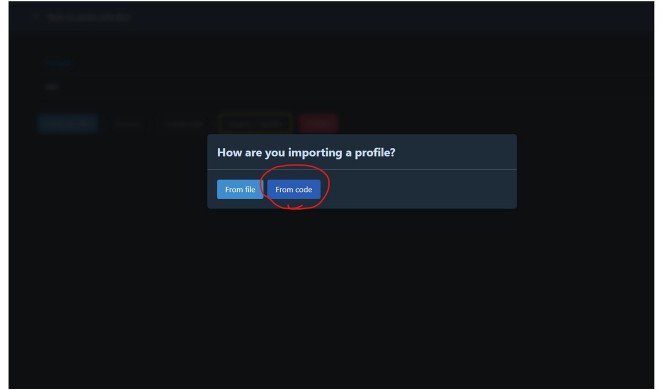
Choose “From code”
An “How are you importing a profile?” dialog opens with two options. Pick From code — the one circled in the screenshot.
From file is for offline profiles; you want From code so r2modman pulls straight from Thunderstore.
Step 03
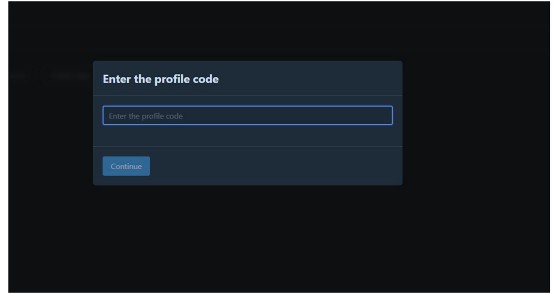
Paste the profile code and Continue
In the “Enter the profile code” box, paste the code from the panel above, then click Continue.
r2modman fetches the latest shared profile, works out the diff against your install, and applies it. When it finishes, launch with Start modded (not Steam's Play button) and you're on the latest modpack.
A few things worth knowing
Updating never touches your saves. It only changes which mods are installed — your world and characters are untouched.
Missing mods after the update is normal. Re-importing reconciles your install with the shared profile, so mods that were dropped get cleaned out — everyone ends up on the same set.
Launch with Start modded. Steam's Play button bypasses r2modman and loads an unmodded game. Always start from inside r2modman.
Hit a snag? See the Quick fixes section of the setup guide, or grab the latest code again from the mod list.